0904 Head First HTML and CSS — Study Log #8
Chapter 10. Divs and Spans: Advanced Web Construction
Keywords: <div> <span> pseudo-classes(伪类) logical sections cascade
- A link can be in a few states: it can be unvisited, visited, or in the hover state (and a couple of other states too — focus and active).
- the right ordering is generally considered: link, visited, hover, focus, and then active.
- You can style each of these states separately with pseudo-classes.
The pseudo-classes used most often with the
<a>element are:link, for unvisited links;:visited, for visited links; and:hover, for the hover state. - Additional pseudo-classes are the
:hover,:active,:focus,:first-child, and last-child pseudo-classes, among others.
- Priority is given first to the author’s styles (that is, your styles), then to the reader’s styles, and then finally to the browser’s default styles.
<div>elements are used to group related elements together into logical sections.
Creating logical sections can help you identify the main content areas, header, and footer of your page.
You can use<div>elements to group elements together that need a common style.- The
widthproperty sets the width of the content area of an element.- The
widthproperty specifies the width for the content area only. - The total width of an element is the width of the content area, plus the width of any padding, border, and margins you add.
- Once you set the width of an element, it no longer expands to fit the entire width of the browser window.
- The
Text-alignis a property for block elements that aligns all inline content in the block element, to the center, left or right. It is inherited by any nested block elements.- You can use descendant selectors to select elements nested within other elements. For instance, the descendant selector
div h2 {...}— selects all<h2>s nested in<div>elements (including children, grandchildren, etc.).
- You can use shortcuts for related properties.
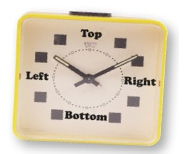
Padding,margin,border,background, andfontproperties can all be specified with shortcuts.- top to right to bottom to left.
font: font-style font-variant font-weight font-size/line-height font-family
- The
<span>inline element is similar to the<div>element: it is used to group together related inline elements and text.- Just like with
<div>, you can add<span>elements toclasses (or give<span>elements uniqueids) to style them. <span class="xx">---</span><div id="oo">---</div>
- Just like with
body {
  font: small/1.6em Verdana, Helvetica, Arial, sans-serif;
}

#elixirs{
  border-width: thin;
  border-style: solid;
  border-color: #007e7e;
  width: 200px;
  padding: 0px 20px 20px 20px;
  margin-left: 20px;
  text-align: center;
  line-height: 1;
  background-image: url(images/cocktail.gif);
  background-repeat: repeat-x;
  float: right;
}

#elixirs h2{
  color: black;
  line-height: 120%;
}

#elixirs h3{
  color: #d12c47;
}

#footer{
  font-size: 50%;
  text-align: center;
  line-height: normal;
  margin-top: 30px;
}

.cd{
  font-style: italic;
}

.artist{
  font-weight: bold;
}

#elixirs a:link{
  color: #007e7e;
}

#elixirs a:visited{
  color: #333333;
}

#elixirs a:hover{
  background-color: #f88396;
  color: #0d5353;
}

.dd a:link{
  color: #007e7e;
}

.dd a:visited{
  color:#333333;
}
Word list
- cocktail
- likewise
- leopard
- mutt
- subsection
- container
- visible
- vertically
- descend
- clash